Project libraryVolume II / Nutrition and AI

AI product · Telegram bot and Mini App

FitHub

From a food photo to a food diary.

You send the bot a photo, text or voice note about your food. AI models recognize the dishes, estimate grams, calories and macros, and log everything to a diary with a daily target.
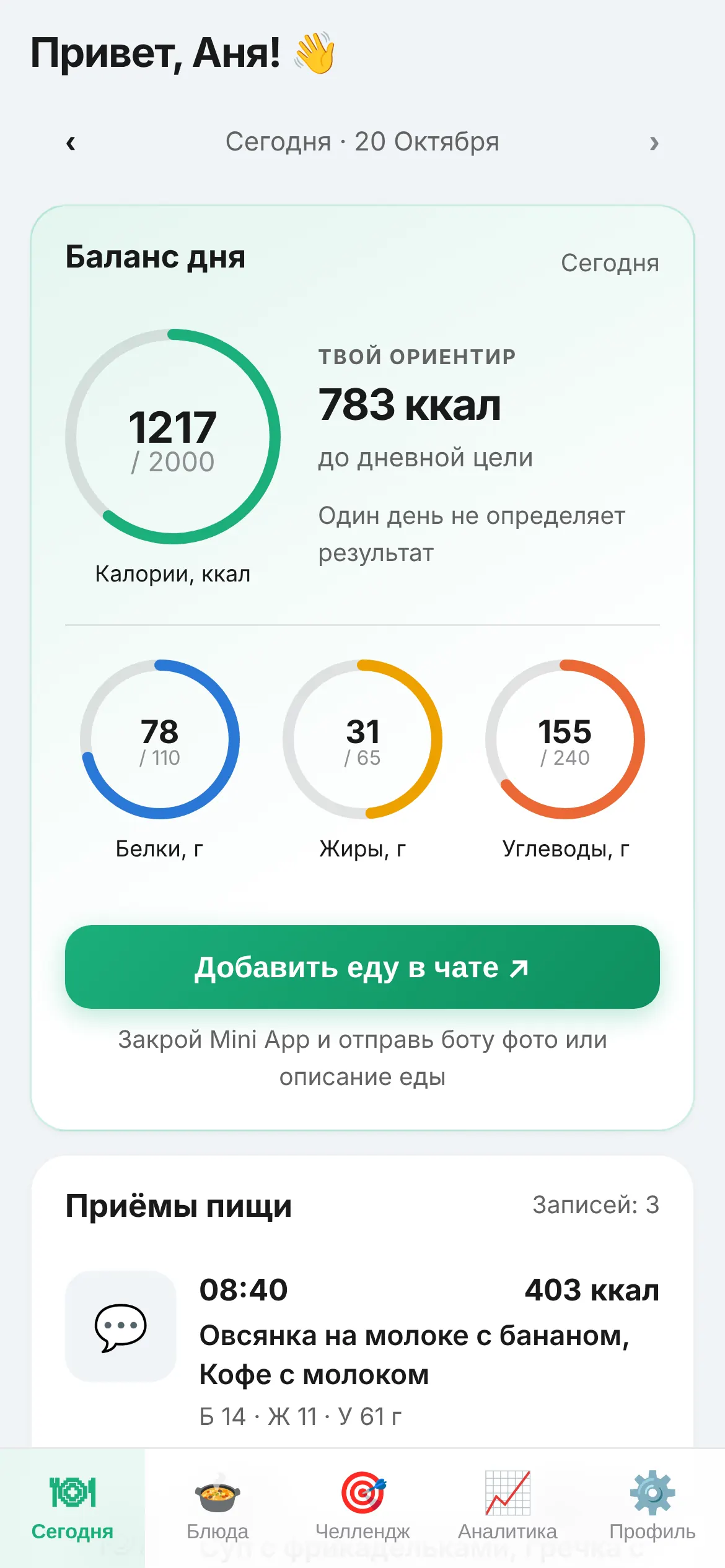
The “Today” screen in the Mini App: 1217 of 2000 kcal, 783 kcal left to the daily goal, protein, fat and carb rings and an “Add food in chat” button. Demo data, fictitious user.
01The “Today” screen: calories and macros against the target. Demo data, fictitious user.
Role
Solo project: idea, product and design; built with AI agents
Timeline
First database migration — 9 July 2026, last commit — 19 October 2026
Status
The bot is live and open to everyone; Pro purchases are paused
How it’s built
Bot and API on Fastify and PostgreSQL, Mini App on React; AI models for photos, text and voice
Testing
163 server unit tests, 16 for the Mini App, 112 integration tests on PostgreSQL in CI
3 ways to log
a photo, text or a voice note up to a minute
291 automated tests
unit tests and integration tests on a real database
6 therapeutic diets
Diet No. 5, Diet No. 9 and four more
6 chal­lenges
the bot checks them against the diary itself

01 / The task

Log a meal in one message.

A photo, text or voice note — and back comes a card with calories, macros and the day’s progress. Three conditions set the boundaries.

Only inside Telegram

The Mini App opens from a button in the bot and identifies the person by Telegram’s login data.

AI costs money

Every recognition is a paid model call, and the product has a free plan.

Free hosting

On Vercel’s Hobby plan, background jobs run once a day; the project has two of them.

02 / Solution

The chat is for logging, the Mini App is for the overview.

01

Photo, text or voice

A photo caption is a hint for the model. Text like “a bowl of borscht and two slices of bread” or a voice note up to a minute gives the same result.

02

A card in reply

Dishes, grams, calories, macros and the day’s progress. If the bot got it wrong, reply to the card: “it was turkey, 200 g”, and the entry is recalculated.

03

The day in the Mini App

Calorie and macro rings, a target from the Mifflin–St Jeor formula, grams on a slider, charts, favorite dishes in one tap.

04

Advice with one action

Based on 7 days of stats and habits like skipping breakfast. Pro — every day, Free — twice a week.

05

Therapeutic diet

Diet No. 5, Diet No. 9 and four more: the bot notes on the card whether the food fits the diet.

06

To bring people back

A photo captioned “can I?” is checked against the diet without being logged. If the day is empty, the bot sends an evening reminder and offers “ate as usual”.

03 / How I worked

How I made decisions.

The code was written by AI agents from my briefs. Below are decisions from the project documents.

  1. Free, Pro and paused payments. Free — 3 recognitions a day, Pro for Telegram Stars — unlimited. Purchases are stopped on the server: a hidden button would have left old invoices payable.
  2. Thresholds — before the run. The photo model is chosen against thresholds set in advance: calorie error up to 20%, up to $0.004 per photo. The reference set is 50 dishes from Nutrition5k. The comparison results are not here.
  3. The diet — as rules, not a name. The model gets the therapeutic diet’s rules as text: given just the name, it answers from memory and differently every time.
  4. Interface audit. Six tabs didn’t fit on a phone — five remain. The macro rings came back, and a loading error no longer looks like an empty diary.
  5. Costs in plain sight. Every AI call is logged with tokens and price. The admin panel shows spending in rubles for the day and for 30 days.
04 / Result and quality

Tested on a real database.

291 automated tests

163 server unit tests, 16 for the Mini App, 112 integration tests on PostgreSQL in CI. They found three defects: for example, the API accepted a challenge of 400 g of protein a day.

The limit can’t be bypassed

The daily limit is deducted atomically, in a single SQL query. One recognition per person at a time; repeated Telegram updates are dropped.

A model failure is not a dead end

A 30-second timeout and a retry on network failure; the reply comes within 45 seconds at most. If the model fails, the attempt is refunded.

Login — only via Telegram

The Mini App opens only with verified Telegram data (HMAC-SHA256); RLS closes the tables to the Supabase public API.

Based on the repository’s code and documentation as of 19 October 2026. There are no figures on users or model accuracy here.

05 / Screens

The Mini App with demo data.

The shots were taken from a working build of the Mini App, but the data is simulated: the user “Anya”, her meals and the AI’s replies are fictitious. Any shot opens full size. Swipe sideways
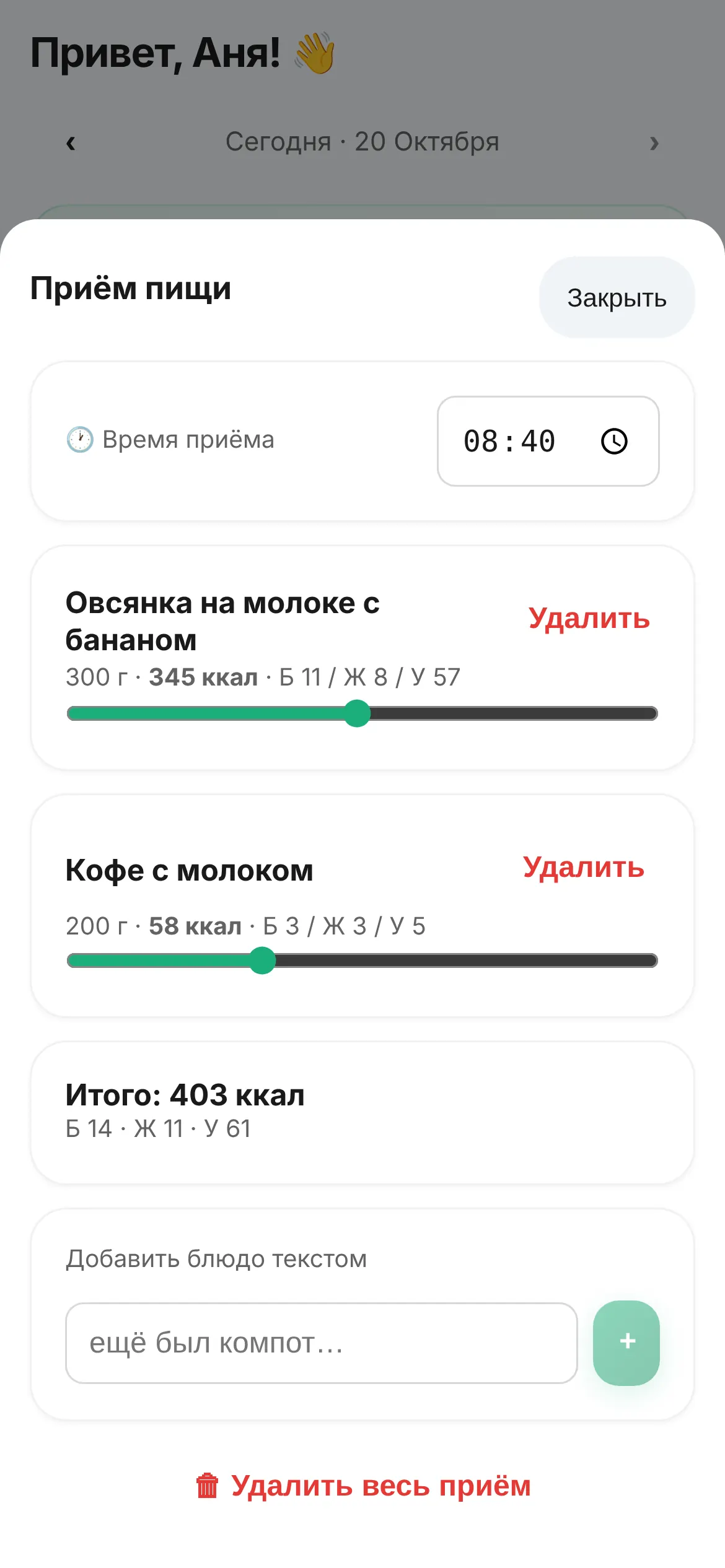
A meal at 08:40: oatmeal with banana, 300 g, and coffee with milk, 200 g; each dish has a grams slider; 403 kcal in total. Demo data, fictitious user.
02A meal: grams on a slider. Demo data, fictitious user.
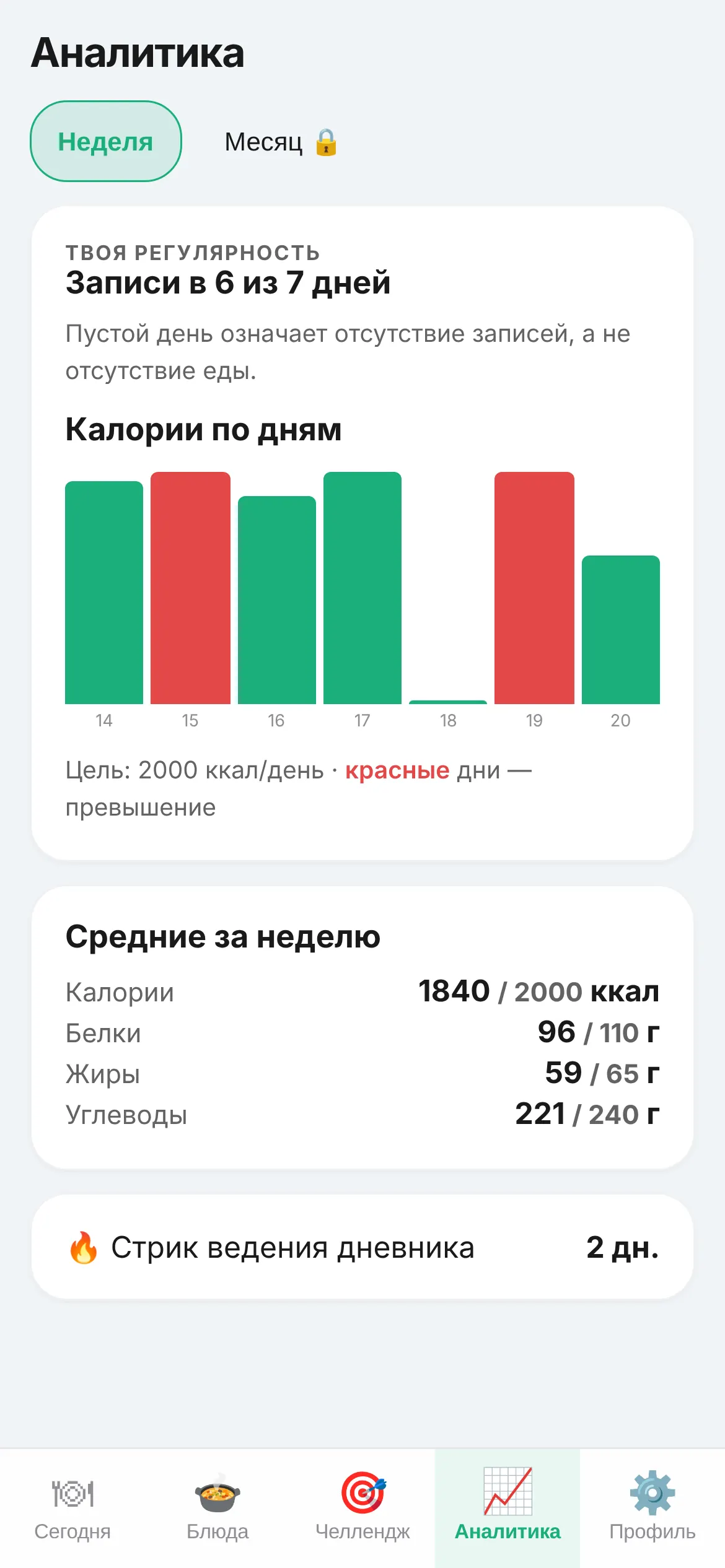
Weekly analytics: entries on 6 of 7 days, calories by day with over-target days in red, weekly averages against the target, a 2-day streak. Demo data, fictitious user.
03The week: calories by day and the streak. Demo data, fictitious user.
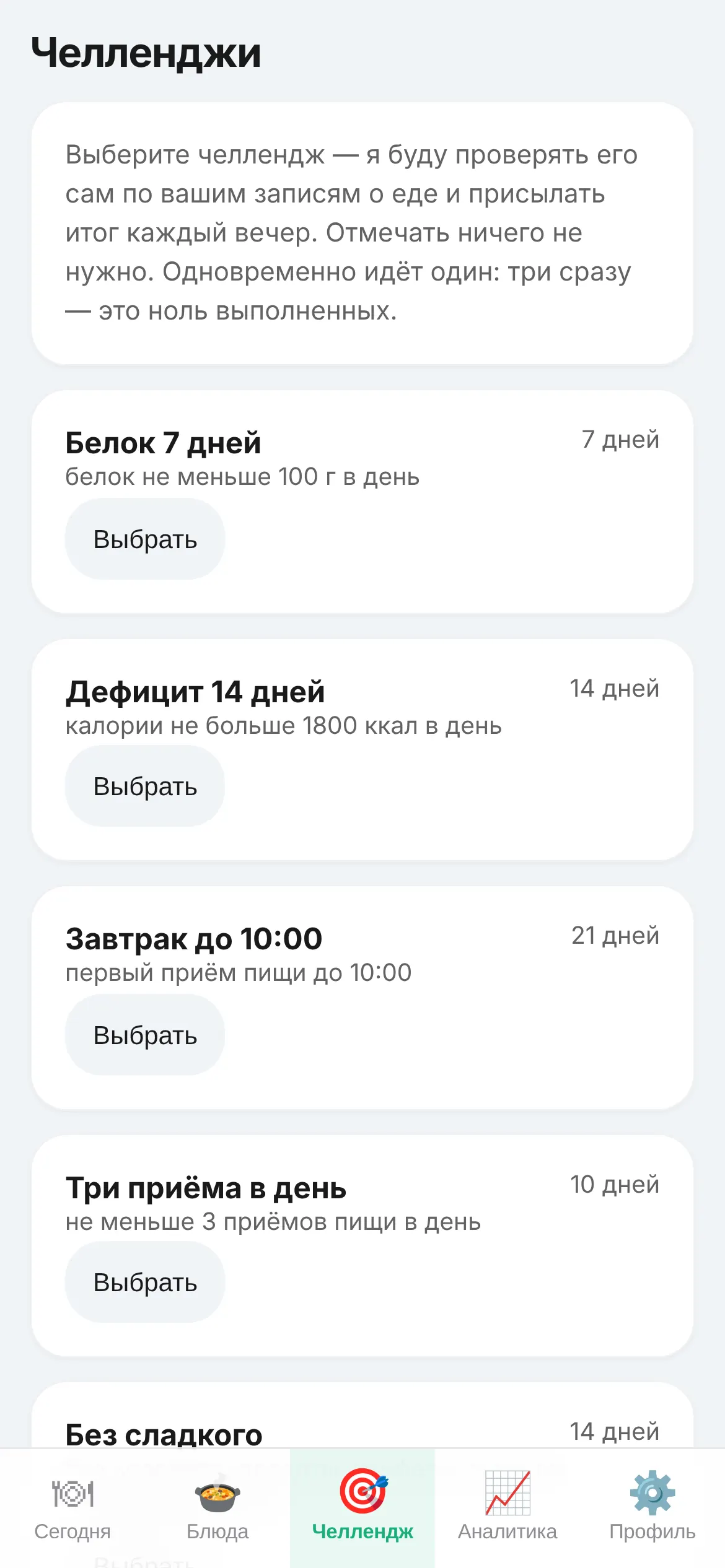
Choosing a challenge: “Protein for 7 days”, “Deficit for 14 days”, “Breakfast before 10:00”, “Three meals a day”, “No sweets”. Demo data, fictitious user.
04Challenges are checked against the entries. Demo data, fictitious user.
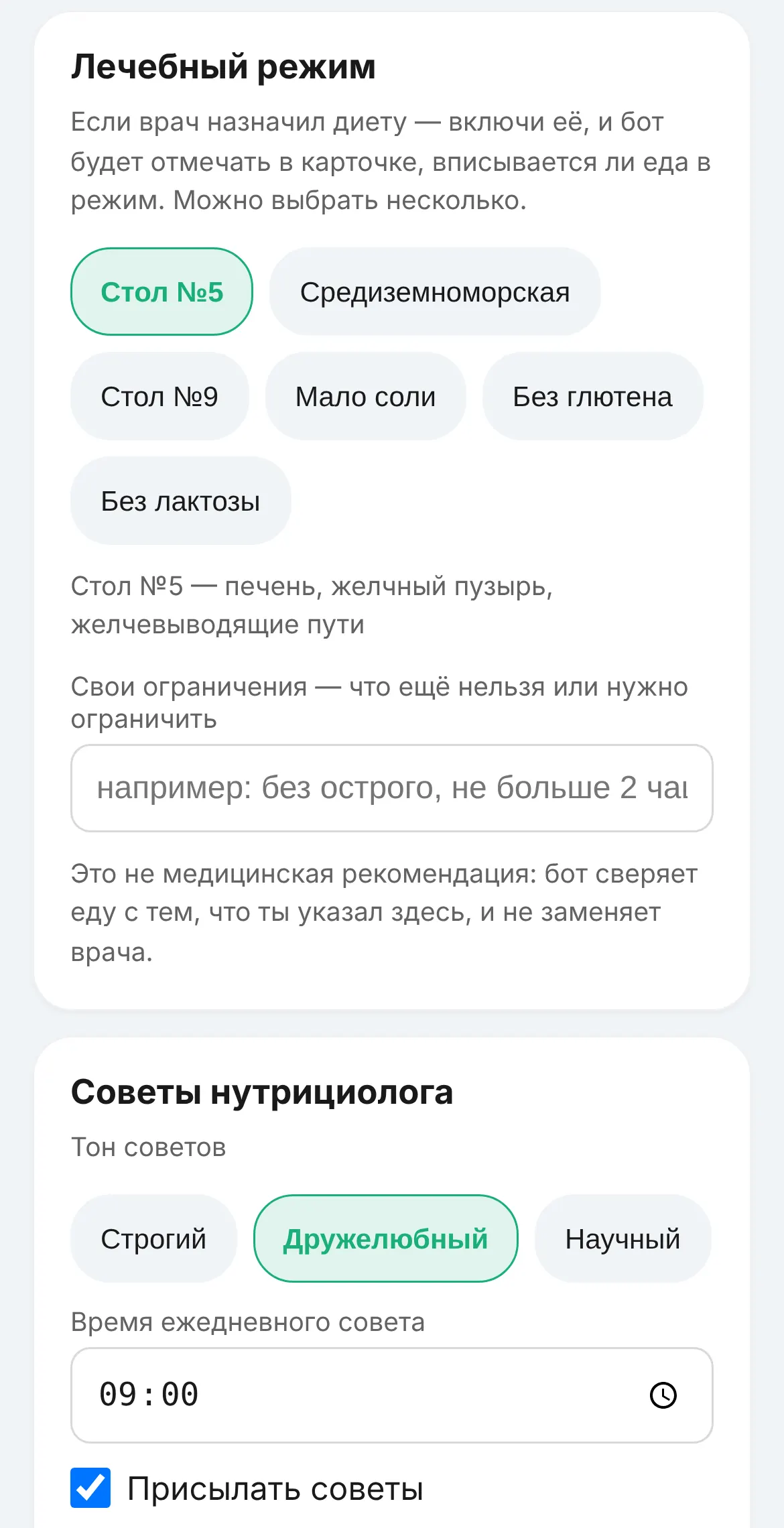
Profile: the therapeutic diet “Diet No. 5” is selected; below are the tone of the nutritionist’s advice and the time of the daily advice. Demo data, fictitious user.
05Therapeutic diet and advice. Demo data, fictitious user.
06 / Architecture

Bot, API and schedule — one service.

Everything runs in a single Vercel function on the free plan.

  • Shared state — in the database. Function instances don’t share memory, so limits, locks and duplicate Telegram updates live in PostgreSQL.
  • Rare runs without losses. Advice and evening summaries are designed for a once-a-day run: a repeat is safe, and unique keys drop duplicates.
  • One entry point for AI. Timeouts, retries and per-call cost tracking — in one module.
Telegrambot chat · Mini App
Vercel functionFastify: grammY bot, API, schedule
PostgreSQLSupabase · Prisma · RLS
AI modelsphoto and voice — OpenRouter · text — DeepSeek

Stack TypeScript · Node 22 · Fastify · grammY · Prisma · PostgreSQL (Supabase) · React + Vite · Telegram Mini App · Telegram Stars · Vitest · GitHub Actions · Vercel

The bot is open to everyone: send it a photo of your lunch.

Open bot
07 / Analytics

Process, data and scenarios — from the code.

Business analysis artifacts reconstructed from the repository’s code and documentation as of 19 October 2026. Every step, relationship and number is checked against a file; the paths are in the captions and in the “As text” blocks.

  1. 7.1From message to diary
  2. 7.2Daily advice
  3. 7.3Data model
  4. 7.4The first day
  5. 7.5Stories and criteria
  6. 7.6Choosing the photo model

7.1 · Process, BPMN notation

From message to diary

Four lanes: the person, the Vercel function, the AI models and the database. There is no confirmation step: the entry is created immediately and can be edited afterwards — with buttons, in the Mini App or by replying to the card. The diagram is in two parts, linked by connectors A, B and C.

  • start
  • step
  • AI model call
  • step not always taken
  • gateway
  • table
  • read and write
  • wait limit
  • refusal with an explanation
  • end without a message
  • result
  • connector between parts

Part 1 · before recognition

Part 2 · recognition, card and editing

  1. Photo, text or voice noteA photo caption is a hint for the model.
  2. Bot and APIAccept the updateCheck the Telegram secret.ProcessedUpdate
  3. Repeated update?
    • yes → ok reply without processing
    no ↓
  4. AI modelnot alwaysTranscribe the voice noteOnly for voice notes up to a minute long; then handled as text.
  5. What arrived?
    photo or text ↓
  6. Bot and APIAnti-spam, daily limit, lockFree — 3 recognitions a day; one recognition at a time.UsageCounter, RecognitionLock
  7. Can it be recognized?
    • no → refusal with an explanation
    yes ↓
  8. PersonThe bot writes “One sec, looking…”
  9. AI modelRecognize dishes, grams, calories and macros30 s timeout and a retry on failure; overall limit — 45 s.
  10. Dishes found?
    • no food, failure or 45 s → a hint, the attempt is refunded
    yes ↓
  11. PostgreSQLSave the mealMeal, MealItem
  12. AI modelnot alwaysCheck against the dietOnly if a diet is set.
  13. PersonMeal cardCalories, macros and the day total, buttons under the card.
  14. Needs editing?No need to confirm the entry: it is already in the diary.
    • buttons, Mini App → time, grams, delete — no AI
    no ↓
  15. Meal in the diaryDay totals — /day and the “Today” screen.
  16. AI modelRecalculate from the correctionThe daily limit is not spent.
  17. PostgreSQLReplace the itemsIn one transaction; the card is redrawn.
  18. Meal in the diary
Fig. 7.1

Three branches of the “What arrived?” gateway are not drawn: the “can I?” check (story US-4 below), text right after a recent entry, and “My dishes” without recognition — they are described in “As text”. The vision model names are not given: in production they are set by environment variables.

Source: in apps/bot-api/src — bot/handlers/food.ts:34–537 · api/routes/webhook.ts:28–79 · services/limits.ts:51–95 · services/locks.ts:18–29 · lib/ai.ts:9–202 · bot/mealCard.ts:22–74; at the root — vercel.json:10–15

Full diagram: part 1 part 2

As text 12 steps and 3 branches outside the diagram

Paths are relative to apps/bot-api/src; vercel.json, CRON.md, HANDOFF.md and docs/ are at the repository root.

  1. The person sends a photo, text or voice note. A photo caption is a hint for the model; commands and text shorter than three characters don’t get here. bot/handlers/food.ts:319–348, 396–401
  2. The function accepts the update: without the Telegram secret — 401. If the environment provides waitUntil, Telegram gets a reply immediately and processing continues in the background. api/routes/webhook.ts:55–79
  3. A repeated update is dropped by update_id in the ProcessedUpdate table — even on another function instance; Telegram gets “ok” without processing. api/routes/webhook.ts:28–63
  4. A voice note longer than 60 seconds is rejected right away. A shorter one goes through anti-spam and the limit check before the paid transcription, then the audio model (by default google/gemini-2.5-flash); the bot shows what it heard and parses it as text. bot/handlers/food.ts:404–457 · ai/food.ts:141–154
  5. A reply to the card is a correction of that entry (connector B, step 12). bot/handlers/food.ts:352–368
  6. Anti-spam: no more than 10 requests a minute per instance and 12 AI calls a minute according to the log. The attempt is deducted in a single SQL query (Free — 3 a day, Pro — unlimited). One recognition per person at a time; a stuck lock is released by a 90-second timeout. bot/queue.ts:4–17 · services/limits.ts:51–95 · services/locks.ts:18–29
  7. If recognition is not allowed — a refusal with an explanation: “too many requests”, “daily limit reached, try tomorrow” (no upsell: purchases are paused) or “still working on your previous meal” — in that case the attempt is refunded. bot/handlers/food.ts:45–65 · bot/helpers.ts:5–11
  8. The bot writes “One sec, looking… 👀”; this message later becomes the card. bot/handlers/food.ts:67
  9. The model recognizes dishes, grams, calories and macros: a photo goes to a vision model via OpenRouter at full resolution, text to DeepSeek (if it fails, to the vision client). The call timeout is 30 seconds, with one retry on a network failure and one on broken JSON; for a photo with confidence below 0.7 a fallback model is asked again. The overall limit is 45 seconds, before Vercel stops the function at the 60th. ai/food.ts:27–97 · lib/ai.ts:9, 162–202 · bot/handlers/food.ts:69–74 · vercel.json:10–15
  10. No food — “take the photo closer and in good light”; a failure or 45 seconds — “send it again”. The attempt is refunded and the lock is released. bot/handlers/food.ts:96–111 · services/limits.ts:77–88
  11. The meal and its items are written to the database; the total is the sum of the items. If a therapeutic diet, custom restrictions or allergies are set, the text model checks the meal against them; if that fails, the card has no mark. The card: dishes, calories and macros, “Today: X / target”, a streak from two days, and a request to clarify when confidence is below 0.6. If the card can’t be built, a short summary arrives and the attempt is not refunded: the recognition has already been paid for. services/meals.ts:7–39 · services/diet.ts:15–30 · bot/mealCard.ts:22–74 · bot/cards.ts:14–62
  12. There is no need to confirm the entry. The time is changed with a button, grams with a slider in the Mini App (calories and macros are recalculated proportionally, without AI); the entry can be deleted or saved to “My dishes”. A reply to the card arrives as a new message: through steps 1–5 it goes to recalculation — the model returns a new list of items, they are replaced in one transaction, and the card is redrawn. The daily limit is not spent. bot/keyboards.ts:12–58 · bot/handlers/food.ts:206–317 · services/meals.ts:52–92

Not drawn

  • The “can I?” check: the same limit, lock and recognition, but instead of a meal a check is saved, marked “not logged to the diary”; the “Log it anyway” button creates a meal without a second model call. bot/handlers/food.ts:122–202 · services/quickCheck.ts:14–62
  • Text when there is already an entry in the last 2 hours: the model itself decides whether it is a correction (the limit is not spent), new food (the limit is deducted) or not about food. bot/handlers/food.ts:370–391, 461–537
  • “My dishes”: the /food command logs a saved dish with a portion multiplier, without recognition and without using the limit. bot/handlers/recipes.ts:28–73

The update_id deduplication is described from the code and is not covered by tests. The 0.7 re-ask threshold is the default value in config.ts:30.

7.2 · Scheduled process

Daily advice

Once a day, at 18:00 UTC, a single function sends out advice, settles challenge results and reminds about empty days, all within 60 seconds. A repeat run is safe: a unique key prevents a second piece of advice for the same date, and anyone not reached gets theirs on the next run.

  • start
  • step
  • AI model call
  • gateway
  • for each profile
  • model failure
  • end without a message
  • result
  1. Every day at 18:00 UTCVercel Cron on the Hobby plan.
  2. Bot and APICheck the secret, restore the webhookThe webhook is set again if it was removed.
  3. For each profile with advice on — in batches of 5 until 28 seconds run out
  4. A date for advice?Today — if the advice time has passed; otherwise yesterday’s missed one. No more than one piece of advice per run.
    • no → skip
    yes ↓
  5. Their day on the plan?Pro — every day, Free — Monday and Thursday.
    • no → skip
    yes ↓
  6. PostgreSQLStats for 7 days
  7. Entries this week?
    • no → skip
    yes ↓
  8. AI modelWrite the adviceThe last line is a single action, “Today: …”.model unavailable → advice on the next run
  9. PostgreSQLSave the adviceUnique key: there will be no second piece of advice for the date.DailyAdvice
  10. “Daily advice” to the chatFree users get a note about Pro.
  11. End of the profile loop
  12. Bot and APIChallenges, reminders and cleanupChallenge results — 18 s, the empty-day reminder — 8 s, old “can I?” checks are deleted.
  13. Done
Fig. 7.2

The price of Vercel’s free plan is precision: advice set for 08:00 arrives at 21:00 Moscow time. The diagram follows vercel.json and CRON.md; the schedule description in the README is outdated.

Source: in apps/bot-api/src — api/routes/cron.ts:15–32 · cron/dailyAdvice.ts:14–123 · prompts/advice.ts:22–34; at the root — vercel.json:46–55 · CRON.md:10–29, 65–72

Full diagram

As text 9 steps

Paths are relative to apps/bot-api/src; vercel.json, CRON.md, HANDOFF.md and docs/ are at the repository root.

  1. Vercel Cron calls /api/cron/hourly once a day, at 18:00 UTC (21:00 Moscow time): the Hobby plan allows two jobs a day; the second, at 08:00 UTC, handles monthly reports and subscriptions. vercel.json:46–55 · CRON.md:10–15
  2. The function checks CRON_SECRET and restores the webhook if Telegram is pointing elsewhere: the bot once stayed silent for three weeks after the webhook was removed. api/guards.ts:14–16 · api/routes/cron.ts:16–20 · HANDOFF.md:115
  3. Profiles with advice turned on are processed in batches of five; the budget is 28 seconds. Those not reached get theirs on the next run, and a warning stays in the log. cron/dailyAdvice.ts:23, 101–123 · api/routes/cron.ts:27
  4. The advice date: today — if the person’s advice time has already passed and there is no advice yet; otherwise yesterday — if there was none for yesterday. No more than one piece of advice per run. cron/dailyAdvice.ts:37–53
  5. Plan: Pro — every day, Free — on Mondays and Thursdays, local time. cron/dailyAdvice.ts:14, 61–62
  6. Stats for 7 days: calories and macros by day, meals after 21:00, breakfast before 11:00, dishes repeated three times or more. Not a single entry for the week — no advice. services/stats.ts:21–92 · cron/dailyAdvice.ts:64–65
  7. The model writes the advice in the tone set in the profile: Free — 2–3 sentences, Pro — 3–5; the last line is a single checkable action, “Today: …”. If the model is unavailable, nothing is saved, and the advice goes out on the next run. prompts/advice.ts:22–34 · cron/dailyAdvice.ts:74–75, 114–119
  8. The advice is saved to DailyAdvice with a unique key (userId, date, kind) and sent to the chat as “🥗 Daily advice”; Free users get a note about Pro. cron/dailyAdvice.ts:86–96 · ../prisma/schema.prisma:175–187
  9. Then, in the same function: challenge results (18 seconds), the empty-day reminder (8 seconds), deletion of “can I?” checks older than 7 days. api/routes/cron.ts:28–30 · services/quickCheck.ts:65–68

7.3 · ER diagram, crow’s foot notation

Data model

10 key models out of 15 in Prisma; challenges and the feed are collapsed into groups. The profile, diary, limits and subscriptions are tied to the user and deleted along with them; the AI cost log stays but loses its link to the person.

  • exactly one
  • zero or one
  • zero or many
  • reference by value, no foreign key
  • → Userthe foreign key points to the table
  • ≈ Mealreference by value, no key
  • limits and money
  • collapsed group
  • PK FK UKprimary, foreign and unique key
  • +5more fields not shown

Person

UserAccount

  • PKid
  • UKtgUserIdTelegram id
  • tztime zone

ProfileProfile and targets

  • PK·FKuserId→ User, 0..1
  • targetKcal …calorie and macro targets
  • medicalDietstherapeutic diets

Diary

MealMeal

  • PKid
  • FKuserId→ User
  • eatenAt
  • tgMessageIdcard in the chat

MealItemMeal item

  • PKid
  • FKmealId→ Meal
  • dish · grams

QuickCheck“Can I?” check

  • PKid
  • FKuserId→ User
  • recognitionfor logging without a second call

RecipeMy dish

  • PKid
  • FKuserId→ User
  • UKnametogether with userId
  • ≈sourceMealId≈ Meal, no key

DailyAdviceAdvice or report

  • PKid
  • FKuserId→ User
  • UKdate · kindtogether with userId

Limits and money

UsageCounterRecognition counter

  • PK·FKuserId→ User
  • PKdatelocal day
  • photoCount

SubscriptionPro subscription

  • PKid
  • FKuserId→ User
  • plan · status

AiUsageAI call log

  • PKid
  • FKuserId→ User, 0..1
  • costUsdcall cost

When the person is deleted, the log stays, userId → NULL.

Collapsed

Challenges3 tables

Challenge · ChallengeParticipant · ChallengeDay; author and participants → User.

Feed2 tables, a stub without a screen

FeedVote · FeedReport; → Meal and → User.

Outside Prisma, created by code

ProcessedUpdate — repeated updates, kept for 2 days. RecognitionLock — one recognition at a time, userId without a key. BenchImage — model comparison bench photos, 2 hours.

Fig. 7.3

In total the schema has 15 models, 9 enums and 17 foreign-key relationships; there are 10 migrations. The cards show the keys and fields that explain each table’s role; all 17 relationships are in “As text”. The feed is a stub: the schema and the service exist, but there is no screen and no API routes.

Source: apps/bot-api/prisma/schema.prisma · apps/bot-api/prisma/migrations · apps/bot-api/src/services/users.ts:51–63 · docs/ARCHITECTURE.md:89, 123–126

Full diagram

As text 17 foreign-key relationships, 3 without a key

Line numbers refer to apps/bot-api/prisma/schema.prisma; the paths src/… and prisma/… are relative to apps/bot-api, HANDOFF.md is at the repository root.

Foreign keyReferencesCardinalityOn deleteLine
Profile.userIdUser1 : 0..1Cascadeschema.prisma:87
Meal.userIdUser1 : 0..NCascadeschema.prisma:124
MealItem.mealIdMeal1 : 0..NCascadeschema.prisma:160
QuickCheck.userIdUser1 : 0..NCascadeschema.prisma:313
Recipe.userIdUser1 : 0..NCascadeschema.prisma:221
DailyAdvice.userIdUser1 : 0..NCascadeschema.prisma:178
UsageCounter.userIdUser1 : 0..NCascadeschema.prisma:292
Subscription.userIdUser1 : 0..NCascadeschema.prisma:203
AiUsage.userIdUser0..1 : 0..NSetNullschema.prisma:40
Challenge.ownerIdUser1 : 0..NCascadeschema.prisma:246
ChallengeParticipant.userIdUser1 : 0..NCascadeschema.prisma:264
ChallengeParticipant.challengeIdChallenge1 : 0..NCascadeschema.prisma:262
ChallengeDay.challengeIdChallenge1 : 0..NCascadeschema.prisma:277
FeedVote.mealIdMeal1 : 0..NCascadeschema.prisma:327
FeedVote.voterIdUser1 : 0..NCascadeschema.prisma:328
FeedReport.mealIdMeal1 : 0..NCascadeschema.prisma:341
FeedReport.reporterIdUser1 : 0..NCascadeschema.prisma:342

Relationships without a foreign key

  • Recipe.sourceMealId → Meal.id: a saved dish survives the deletion of the source meal schema.prisma:230
  • ChallengeDay.userId → User.id: a column with no relation in Prisma or in the migration schema.prisma:278 · prisma/migrations/20260917150000_challenges
  • RecognitionLock.userId → User.id: a table outside Prisma src/services/locks.ts:11

Tables outside Prisma

  • ProcessedUpdate (updateId PK, createdAt): repeated Telegram updates; rows older than 2 days are deleted src/api/routes/webhook.ts:28–47
  • RecognitionLock (userId PK, lockedAt): one recognition per person; a stuck lock is released after 90 seconds src/services/locks.ts:8–29
  • BenchImage (id PK, dataUrl, createdAt): model comparison bench photos, kept for 2 hours src/api/bench.ts:48–56

Deleting an account is a single action: prisma.user.delete; the delete rules do the rest src/services/users.ts:51–63. The schema has 9 enums and 10 migrations. The Meal.photoS3Key field is unused and not shown on the diagram HANDOFF.md:122.

7.4 · User journey

The first day in FitHub

The journey is reconstructed from the code, not from interviews: at each stage — what the person does, how the product responds and which failure is handled in advance. There is no emotion curve: there is no data on how people feel.

  1. 1 · minute 0

    Getting started

    Wants
    To understand what the bot can do
    Does
    Opens @Fithub_ai_bot and taps “Start” — or arrives via a challenge invite link.
    Where
    bot chat/start
    Product responds
    Creates the user and in one message explains photos, captions, corrections by reply, voice and “can I?”; a button opens the Mini App.
    Failure handled in advance
    Via the link, the person goes straight into the challenge, and feasibility is calculated for the person joining, not for the author.

    bot/handlers/account.ts:19–86

  2. 2 · three steps

    Targets in the Mini App

    Wants
    To learn their target
    Does
    Three steps: about me; activity and goal; diet type and allergies. Taps “Calculate targets”.
    Where
    Mini App: onboardingthe “Done!” screen
    Product responds
    Login via the Telegram signature, a 12-hour session. The target follows the Mifflin–St Jeor formula: “lose weight” −15%, “gain weight” +10%. At the end: “Now send the bot a photo of your first meal”.
    Failure handled in advance
    Opened the link in a regular browser — the screen names the reason. A cleared field doesn’t turn into zero. A non-existent time zone is rejected.

    apps/webapp/src/App.tsx:29–80 · apps/webapp/src/screens/Onboarding.tsx:28–94 · services/nutrition.ts:26–46

  3. 3 · ~10 seconds

    First entry

    Wants
    To log food without manual input
    Does
    Sends a photo of lunch, writes “a bowl of borscht and two slices of bread” or says it by voice.
    Where
    “One sec, looking…”meal card
    Product responds
    Recognizes dishes, grams, calories and macros, saves the meal and turns the status message into a card with the day total.
    Failure handled in advance
    No food — advice to shoot closer, the attempt isn’t spent. Over 45 seconds — “send it again”. Two photos in a row — “I’m still working on the previous one”. A voice note over a minute — refused before the paid transcription.

    bot/handlers/food.ts:34–112, 404–456

  4. 4 · optional

    Editing

    Wants
    To fix it if the bot got it wrong
    Does
    Replies to the card “it was turkey, 200 g”, changes the time with a button, moves the grams slider or deletes the entry.
    Where
    reply to the cardbuttonsMini App: meal
    Product responds
    Recalculates the items and redraws the same card; the slider recalculates calories and macros proportionally, without the model.
    Failure handled in advance
    People don’t use reply: if there is an entry within 2 hours, the model itself decides whether it’s a correction or new food. A correction doesn’t spend the limit.

    bot/handlers/food.ts:206–237, 370–391 · bot/cards.ts:45–48

  5. 5 · after every entry

    Day totals

    Wants
    To see how much is left to the target
    Does
    Looks at the card, types /day or opens “Today” in the Mini App.
    Where
    “Today: X / target”/dayMini App: “Today”
    Product responds
    A calorie bar, a streak from two days, macro rings. One hint: over by more than 5% — “only water or tea from here”; after 16:00, if protein is short by 25 g or more — what to cover it with.
    Failure handled in advance
    The hint doesn’t always appear: “a hint that is always there stops being read”. A vegan won’t be offered cottage cheese. The fourth photo on Free gets an honest “try tomorrow”.

    services/nextStep.ts:1–44 · bot/handlers/account.ts:89–106

  6. 6 · evening and the next day

    Sticking with the diary

    Wants
    Not to forget about logging
    Does
    On an empty day, gets an evening reminder with three buttons. Later, “Daily advice” arrives.
    Where
    “Nothing in your diary today”“Daily advice”
    Product responds
    The reminder — from 17:00 local time, once a day, to those who wrote in the last 14 days or signed up in the last three days. Advice — Pro every day, Free on Mon and Thu.
    Failure handled in advance
    “Ate as usual” won’t work on the first day: it needs at least two days with entries, and the bot honestly asks to describe the food. “Don’t remind me” turns off the reminders with one tap.

    cron/reminders.ts:19–63 · cron/schedule.ts:41–53 · cron/dailyAdvice.ts:56–98

Open gaps

  • There is no diary export — the bot says so before account deletion. bot/handlers/account.ts:129 · HANDOFF.md:119
  • The Mini App counts dates by the device calendar, the server by the profile’s time zone; reconciling them is postponed. docs/ux-ui-audit.md:36
  • Advice arrives once a day, at the moment of the single run (18:00 UTC, 21:00 Moscow time), not at the time chosen in the profile; the empty-day reminder comes in the same run. CRON.md:13, 28–29

Fig. 7.4The time labels are not measurements: “~10 seconds” is an estimate from the bot’s own text (“it takes ten seconds”). Stages 1 and 2 can be done in any order: a photo is accepted even without onboarding, and then the card shows calories without a target. Paths are relative to apps/bot-api/src unless stated otherwise.

7.5 · Requirements

User stories

Six stories the product already fulfills, with “Given — When — Then” acceptance criteria. 25 of 30 criteria are confirmed by integration tests on a real PostgreSQL; the other five are marked “from code”.

US-15 criteria · all with tests

Log food from a photo

As a person who watches their diet, I want to send a photo of my plate so that the meal is logged with grams, calories and macros without manual input.

Given
a profile exists and the daily limit is not used up
When
a food photo arrives
Then
a meal with items and a total — the sum of the items — appears in the diary; the reply is a “Meal logged” card

testbot-flows.test.ts:99

4 more criteria
  1. Given
    Free, the daily limit is used up
    When
    a photo, text or voice note arrives
    Then
    nothing is logged; the bot names the limit and suggests trying tomorrow without selling anything; the photo isn’t even sent for recognition

    testbot-flows.test.ts:113, 126 · limits-subscription.test.ts:15

  2. Given
    the model provider doesn’t respond
    When
    a photo arrives
    Then
    the person sees “Couldn’t recognize it”, the attempt is returned to the limit, the next photo goes through

    testprovider-failures.test.ts:58, 68, 78

  3. Given
    there is no food in the photo
    When
    the model says so
    Then
    the bot replies “I don’t see any food in this photo” and advises shooting closer, in good light; the attempt isn’t spent

    testprovider-failures.test.ts:93

  4. Given
    the meal is already logged
    When
    the card couldn’t be built
    Then
    the entry stays, the person gets a short summary; the attempt isn’t refunded — the recognition has already been paid for

    testprovider-failures.test.ts:105

US-25 criteria · 4 with tests

Correct the estimate

As a person whose dish or portion the bot got wrong, I want to correct the entry with one phrase or a slider so that the diary stays accurate.

Given
there is a meal card in the chat
When
the person replies to it “it was turkey, 200 g”
Then
the meal’s items are replaced, the bot replies “Updated”

testbot-flows.test.ts:160

4 more criteria
  1. Given
    the meal is open in the Mini App
    When
    the person changes an item’s grams
    Then
    calories and macros are recalculated proportionally; someone else’s meal returns 404

    testapi-core.test.ts:158, 172

  2. Given
    the meal is open in the Mini App
    When
    the person sets the meal time in the future
    Then
    the server responds with a 400 error

    testapi-core.test.ts:186

  3. Given
    there is an entry in the last 2 hours
    When
    the person writes “is it really 200 grams?” without replying to the card
    Then
    the message is treated as a correction, not a “can I?” check

    testretention.test.ts:76

  4. Given
    there is a meal card in the chat
    When
    the person replies with a correction
    Then
    the daily recognition limit is not spent

    from code

Code: bot/handlers/food.ts:206–237

US-34 criteria · 3 with tests

Log by voice

As a person whose hands are busy, I want to dictate what I ate so that logging needs neither a photo nor typing.

Given
a profile exists
When
a voice note up to a minute long arrives
Then
the bot shows the transcribed text and logs the meal as if from text

testbot-flows.test.ts:205

3 more criteria
  1. Given
    a voice note longer than 60 seconds
    When
    it arrives
    Then
    transcription doesn’t start, the bot asks to keep it within a minute

    testbot-flows.test.ts:215

  2. Given
    transcription failed
    When
    a voice note arrives
    Then
    the bot writes “Didn’t catch that”, nothing is logged

    testbot-flows.test.ts:226

  3. Given
    Free, the limit is used up, no entries in the last 2 hours
    When
    a voice note arrives
    Then
    the limit message arrives before the paid transcription

    from code

Code: bot/handlers/food.ts:417–433

US-45 criteria · 4 with tests

Ask “can I?” without logging

As a person on a therapeutic diet, I want to ask whether I can have this dish so that I can decide before eating and not clutter the diary.

Given
Diet No. 5 is set
When
“can I have fried potatoes?” arrives
Then
a “Check · not logged to the diary” card arrives with a mark for the diet; no meal is created, the check is saved

testretention.test.ts:40

4 more criteria
  1. Given
    a profile exists
    When
    a photo arrives with the caption “can I?”
    Then
    the same check, without logging

    testbot-flows.test.ts:146

  2. Given
    a check card has arrived
    When
    the person taps “Log it anyway”
    Then
    the meal is created without a second model call and with the same diet mark

    testretention.test.ts:51

  3. Given
    the check has already been logged
    When
    the person taps the button again
    Then
    the bot replies that the check is outdated; there is no second entry

    testretention.test.ts:65

  4. Given
    the check is older than 7 days
    When
    the daily run fires
    Then
    it is deleted

    from code

Code: services/quickCheck.ts:65–68 · api/routes/cron.ts:30

US-55 criteria · all with tests

Not forget the diary in the evening

As a person who forgot to log their food, I want to get an evening reminder with a ready-made option so that the day doesn’t stay empty.

Given
it is evening local time, there are no entries for the day, the person is active
When
the scheduled run fires
Then
“Nothing in your diary today” arrives with three buttons, and the send date is stored

testretention.test.ts:94 · reminders.test.ts:7

4 more criteria
  1. Given
    there was already a reminder today, or it is daytime now
    When
    the run repeats
    Then
    there is no second reminder

    testretention.test.ts:102 · reminders.test.ts:10, 16

  2. Given
    there is an entry for the day, or the person has long been inactive
    When
    the run fires
    Then
    there is no reminder; a newcomer without entries does get one

    testretention.test.ts:114, 120 · reminders.test.ts:20

  3. Given
    there are at least two days with entries in two weeks
    When
    the person taps “Ate as usual”
    Then
    an average day is logged; pressing again is refused: “there are already entries”

    testretention.test.ts:130

  4. Given
    a reminder has arrived
    When
    the person taps “Don’t remind me”
    Then
    reminders are turned off for them

    testretention.test.ts:142

US-66 criteria · 4 with tests

Get advice with one action

As a person who keeps a diary, I want to get advice on my week once a day so that I understand what to change today.

Given
people in different time zones have entries
When
the run fires twice
Then
each person gets no more than one piece of advice per run, and never two for the same date

testcron-timezones.test.ts:69

5 more criteria
  1. Given
    yesterday’s advice wasn’t sent
    When
    the next run fires
    Then
    it is sent once and stops there

    testcron-timezones.test.ts:88

  2. Given
    there are no entries for the week, or advice is turned off
    When
    the run fires
    Then
    there is no advice

    testcron-timezones.test.ts:104, 110

  3. Given
    the advice is written
    When
    it is sent to the chat
    Then
    the text has no markdown asterisks

    testcron-timezones.test.ts:119

  4. Given
    the Free plan
    When
    today is neither Monday nor Thursday
    Then
    there is no advice; on those days — a short one with a note about Pro

    from code

  5. Given
    the model writes the advice
    When
    the prompt is built
    Then
    the last line is a single checkable action, “Today: …”; this is a prompt requirement and is not checked by a test

    from code

Code: cron/dailyAdvice.ts:14, 61–62, 95 · prompts/advice.ts:24–31

Fig. 7.5The stories are formulated from the code and tests: there is no backlog in this format in the repository. The tests stub out the model calls — they check the product’s behavior, not recognition quality. The tests are in apps/bot-api/src/__tests__/integration, reminders.test.ts is one level up.

7.6 · Research

Choosing the photo model

Only the method is here. The results, charts and the decision are in a separate write-up.

Write-up

How I chose a model for food photos

Seven vision models, 50 dish photos with ground truth from the open Nutrition5k dataset, two answers per photo. The thresholds — calorie error, price, response time and failure rate — were set before the run.

Read the write-up
7
models in the final
700
calls: 7 models × 50 photos × 2 repeats
$2.37
cost of the run

Based on the repository’s code and documentation as of 19 October 2026; the model research is a separate branch from 20 October 2026, not merged into main. The diagrams are simplified; the full versions are in the “As text” blocks.